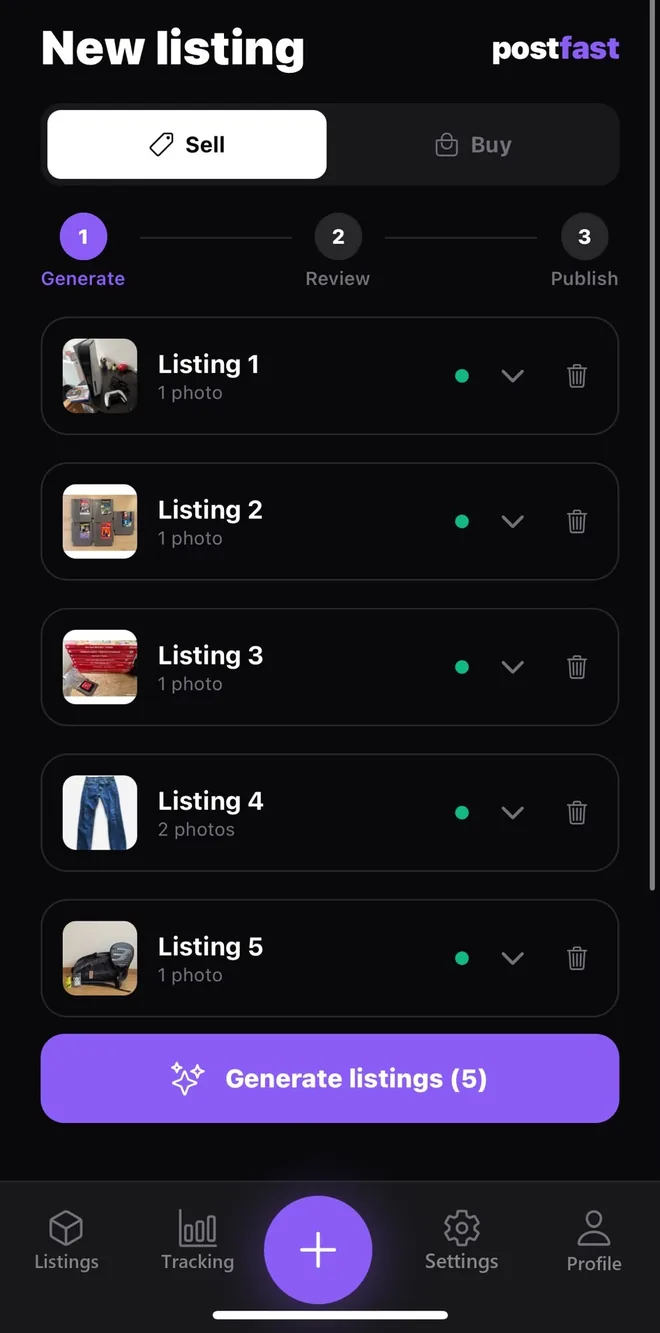
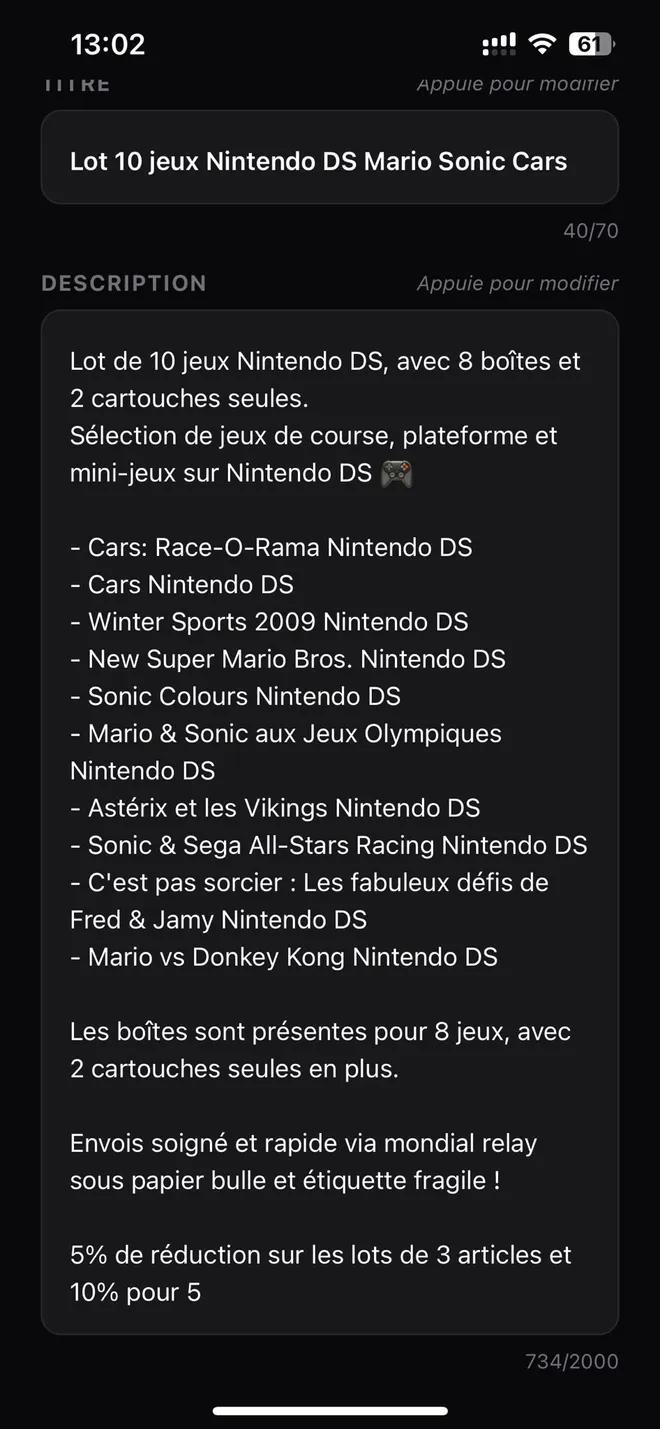
The reseller's AI assistant: from photo to sale, by way of valuation, buying and tracking. Photograph an item, the AI reads your photos, writes the listing and estimates the price — up to 20 listings in one go, 1 listing = 10 seconds. Then track your purchases, your sales and your real margins.
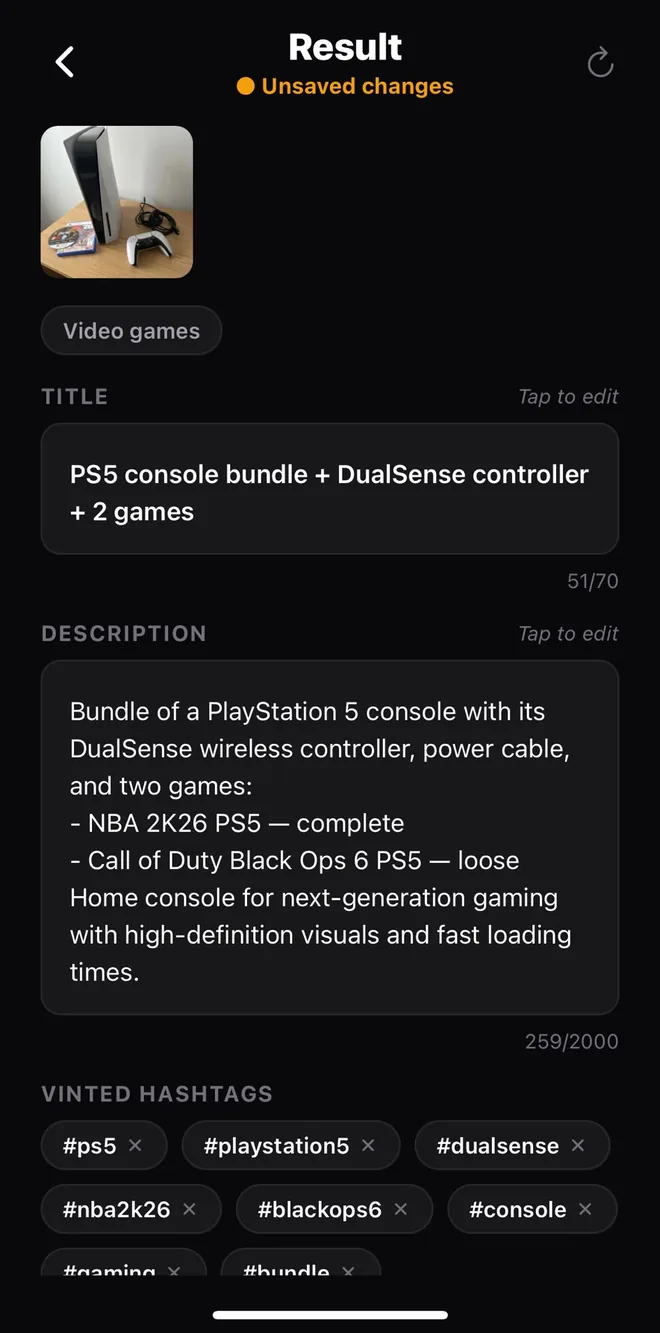
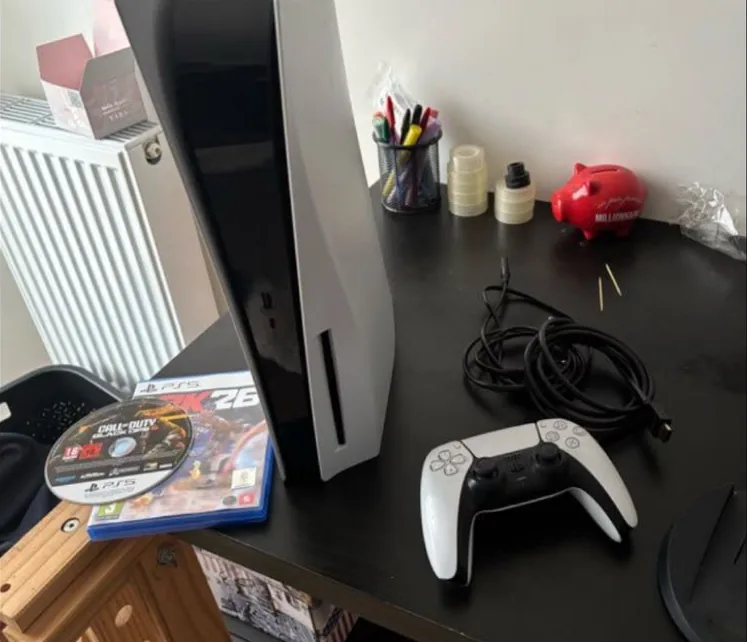
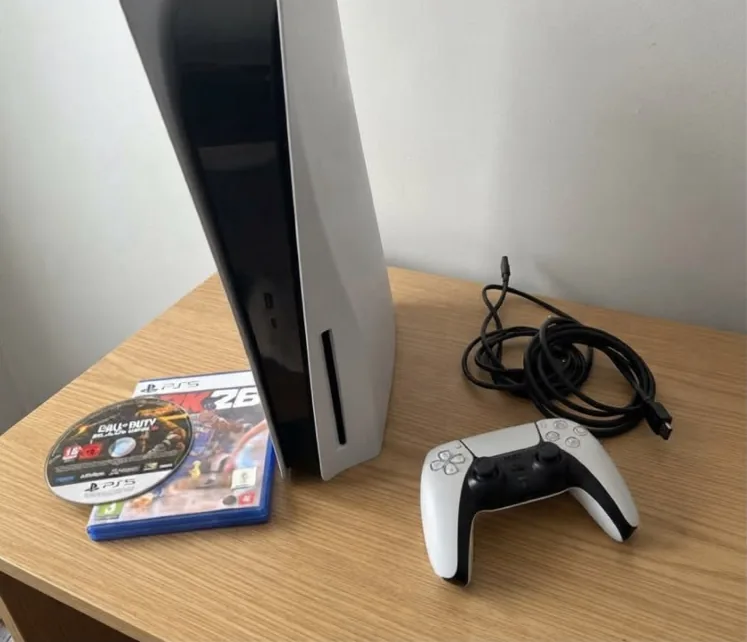
A PS5, its controller, its cables and two games, photographed on a cluttered desk. Here is what Postfast made of them.
The seller's photoEdited by the AI · styled setting
Video games · written by Postfast
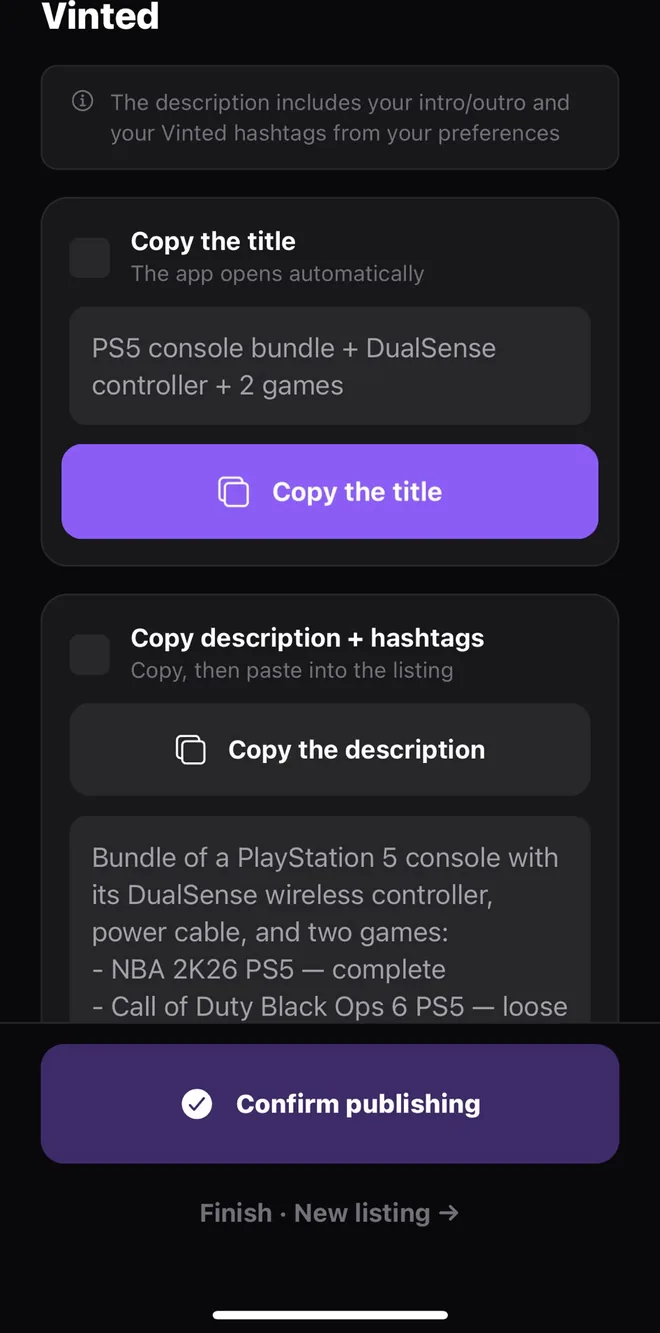
PS5 console bundle + DualSense controller + 2 games
Bundle of a PlayStation 5 console with its DualSense wireless controller, power cable, and two games:
- NBA 2K26 PS5 — complete
- Call of Duty Black Ops 6 PS5 — loose
Home console for next-generation gaming with high-definition visuals and fast loading times.
Written by Postfast from the seller's photos. Before saving, the seller fixed one detail: the AI had the boxed game and the loose disc the wrong way round. That's why every listing opens for review before you publish it.
Photo editing, mode by mode
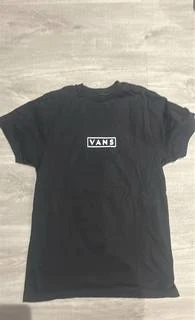
An item
Your photoStudio backgroundStyled setting
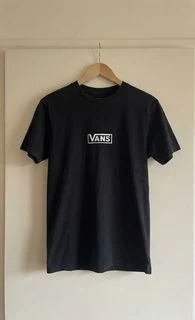
Clothing
Your photoInvisible mannequinOn a hanger
These are real renders from the app's model. For clothing, the studio background is offered too. The mannequin smooths the fabric a little: the app warns you first. 1 photo edit = 1 generated image — 3 free once, 10 a month with Plus.
How it works
1 listing = 10 seconds
In the morning, you photograph the day's items — ten or so, say. You hit generate: the listings are written in the background, and you post them whenever you get a moment, or while the rest are still generating. You log your purchases and link them to your sales: you know exactly what you're making.
Step 1
Generate
Photograph your item — up to 20 photos per listing, the first five of which our vision AI reads to write the title, the description, an estimated price and the hashtags.
Step 2
Edit
Title, description, price, hashtags — everything stays editable. Add your notes; tone and emojis are set once, in Settings. The perfect listing in seconds.
Step 3
Publish
On Vinted, Gumtree or Marketplace it's assisted copy and paste: the title is copied for you, then the description the moment you need it — or, for sellers in France, publish straight to eBay from your own account, no copy and paste. See the eBay guide →
First time? The Getting started guide walks you through it, from the first photo to the first sale.
Estimate before you buy
Know what it resells for before you pay
At a car boot sale, a flea market or a consignment shop: photograph an item and Postfast estimates its resale value. You see your potential margin against the asking price — and you check the real figure before your wallet comes out.
Scan on the spot
One photo is enough. The AI identifies the item — a whole job lot too, piece by piece — and estimates its second-hand market value.
Potential margin & ROI
Enter the asking price and Postfast works out your margin and your return if you resell at market value. Enough to haggle on solid ground.
Check the real price
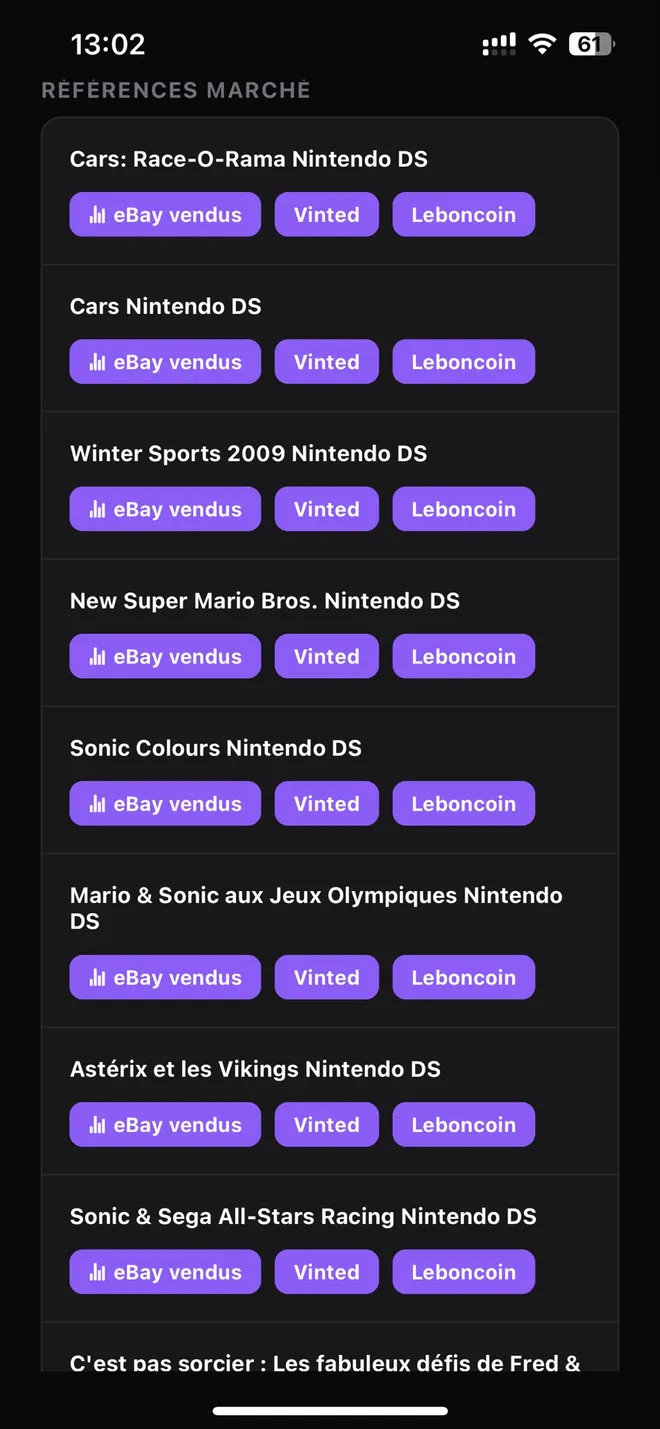
Direct links to items that actually sold on eBay, plus Vinted and the main classifieds site in your country (Gumtree in the UK, DoneDeal in Ireland). The estimate is a starting point — the call is yours.
Once you have bought the item, record it in one tap: its cost joins your margin tracking. From the estimate to the sale, everything follows through.
Buy · Sell · Track
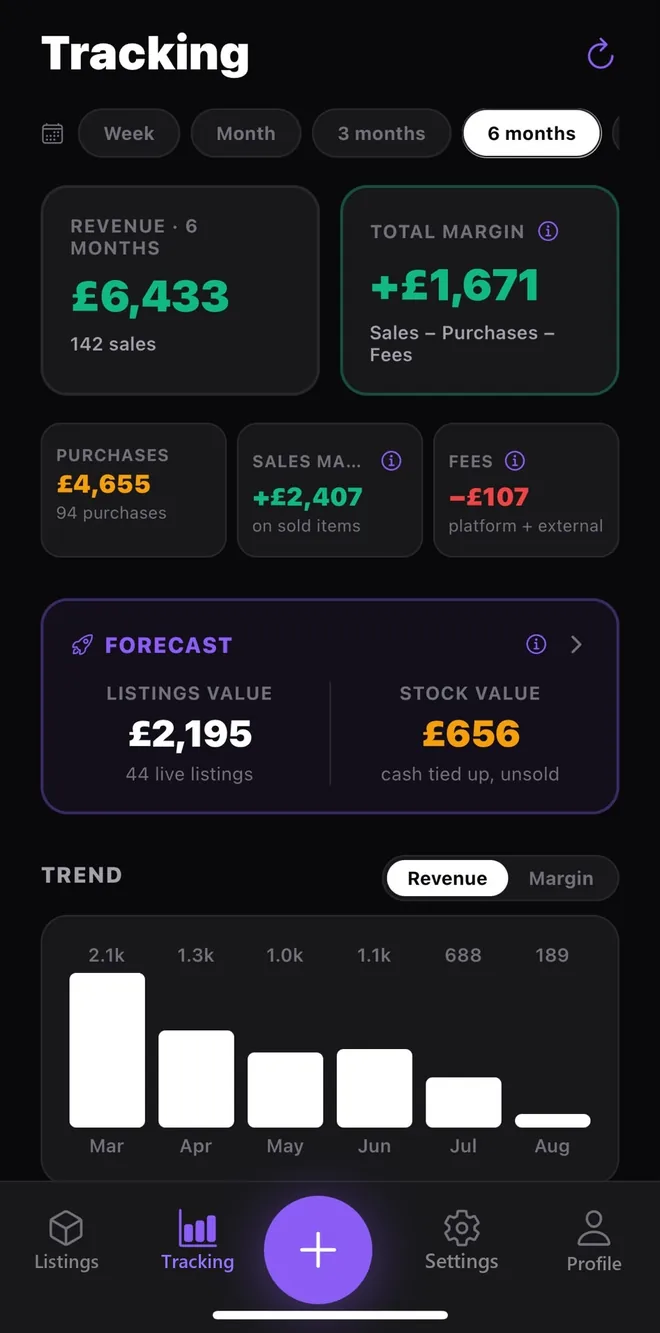
Follow your resale margin, from purchase to sale
Postfast does not stop at the listing. Every sale is tied back to its purchase, so your real margin is worked out item by item and lot by lot.
1
Buy & record
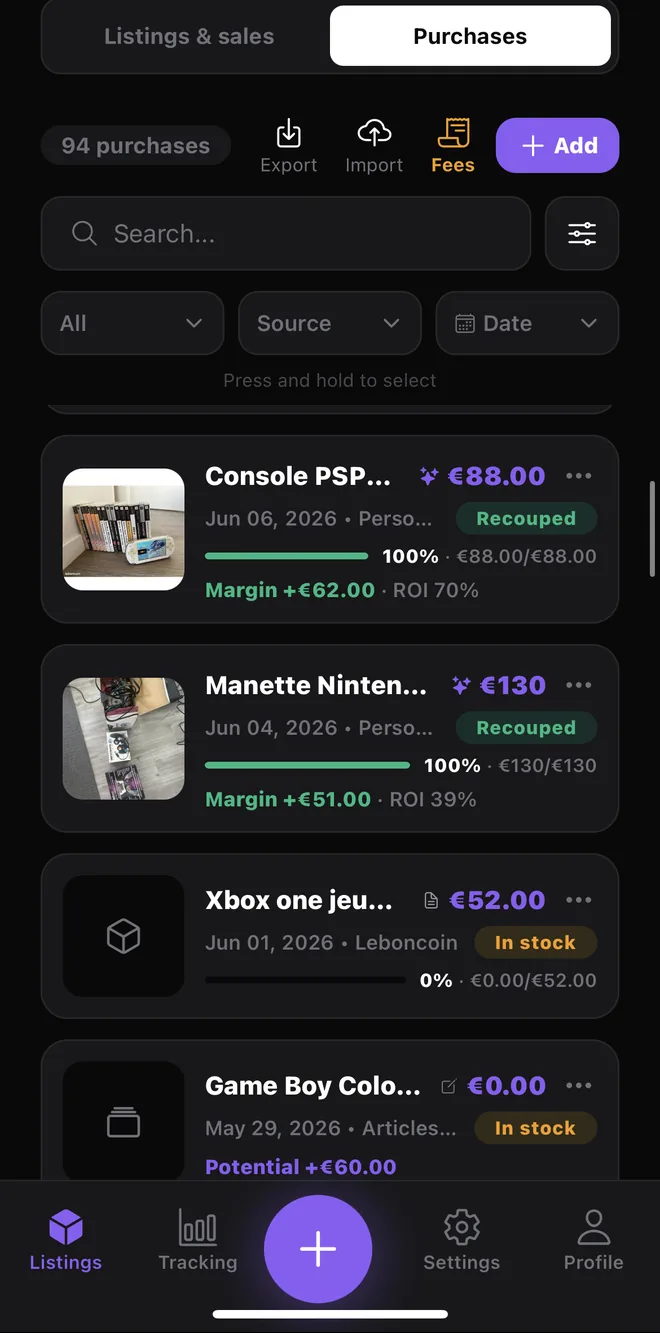
Log what you buy at car boot sales, flea markets or consignment shops, by hand or from a photo. For a job lot, the cost is split automatically across items in proportion to their value.
Price, date, source, notes and photos
AI estimate of the resale value
CSV import of your existing purchases
2
Generate & sell
Turn each item into a listing in seconds. Split a job lot into several sales (the console on its own, the games as a bundle…), publish to eBay in one tap (sellers in France) or copy-paste elsewhere.
An AI listing ready to publish
Split one lot into one or many listings
Mark as sold: price, platform fees, net
3
Track your margins
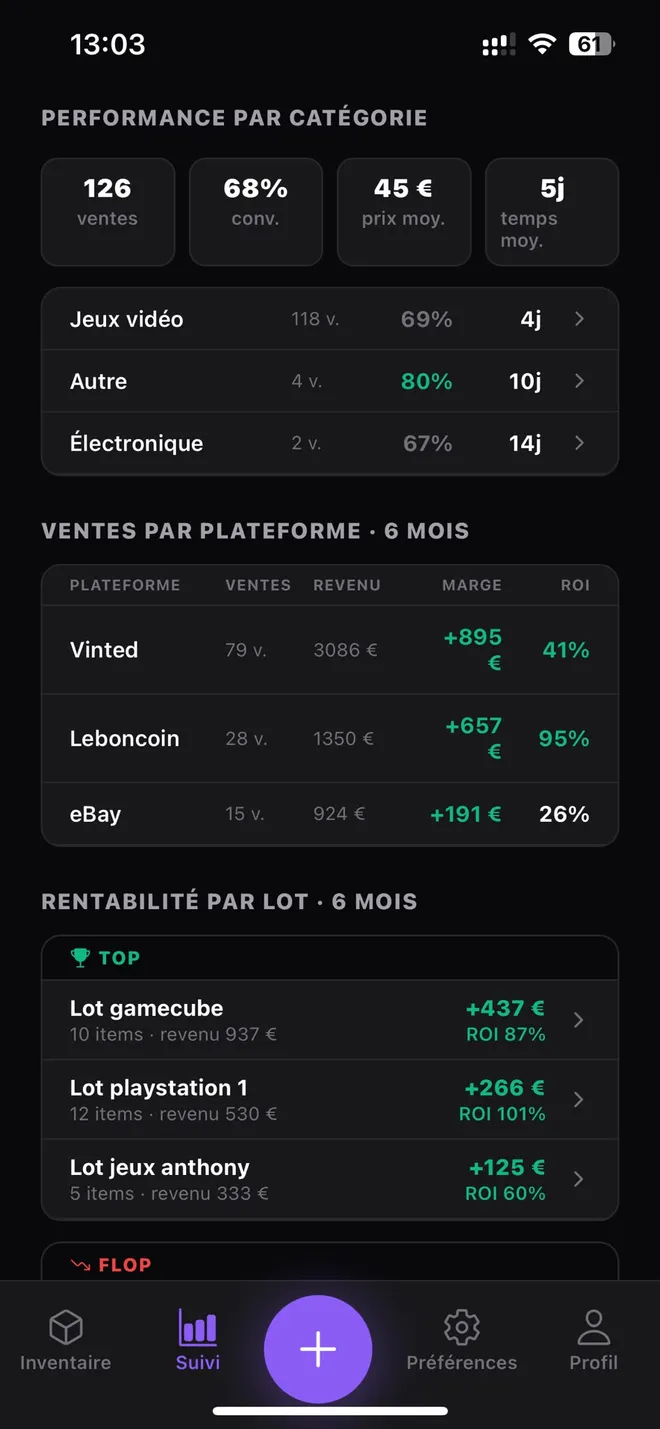
Every sale is linked to its purchase, so Postfast works out your real net margin and ROI. Spot your best lots, your dormant stock and anything going out at a loss.
Net margin & ROI per sale and per lot
Best and worst lots, performance by category and platform, purchases by source
Alerts: dormant stock, sales at a loss, time to relist
One job lot, its cost, item by item
You buy a job lot for €120 at a car boot sale: a console that resells for around €80, and 8 games at around €15 each. Postfast shares the €120 out in proportion to each item's value, not in equal parts.
Item
Estimated value
Share of the lot
Cost assigned
Console
€80
40%
€48
Each game (×8)
€15
7.5%
€9
Total
€200
100%
€120
When the console sells, its margin is worked out on €48 — not on €120, nor on an equal share of €13.33. Work out the margin on a sale →
Writing the listing is only the start. Postfast runs your whole resale business: purchases, sales, stock and profitability in one place.
By hand or with Postfast
What changes in your day
The same steps as usual. What goes is the retyping and the spreadsheet.
Step
By hand
With Postfast
Writing the listing
Title, description and hashtags typed one by one
The AI writes them from your photos, you review
Several items
One listing after another
Up to 20 at once (5 on the free plan), written in the background
Setting the price
Hunting for comparable sales yourself
Sold listings on eBay in one tap, plus an AI estimate except for clothing
Posting on several sites
Retyping the text on each platform
Assisted copy and paste, and direct eBay publishing for sellers in France
The cost of a job lot
Split roughly, often in equal shares
Shared out in proportion to each item's value
Your real margin
A spreadsheet to keep up to date
Worked out on every sale, platform fees included
Features
Generate, sell, track your margins — all in one place
Postfast takes the repetitive work off your hands so you can get on with the part that matters: selling.
The listing
Title, description, hashtags and price
From your photos, the AI writes the title, the description and the hashtags, and estimates the price — with links to items that actually sold on eBay, plus Vinted and the main classifieds site in your country — Gumtree in the UK, DoneDeal in Ireland — so you can check.
Written in the language you sell in
The AI writes in the language of your selling country, in 8 languages. A British seller living in Berlin keeps the app in English and the listings in German.
Up to 20 listings in one go
Set up your items back to back and hit generate: the listings are written in the background, the first one opens while the rest are still being written. 5 at a time on Free, 20 with Plus.
AI photo editing
A studio background or a styled setting for an item; a studio background, an invisible mannequin or a hanger for clothing. The point is to present the item better, not to disguise it: you compare with your original before keeping the render. The mannequin smooths the fabric a little, and the app warns you first.
Posting
51 platforms across 13 countries
eBay, Vinted, Facebook Marketplace, Etsy, Vestiaire Collective, Depop, Gumtree, Vivastreet, Shpock, Preloved and Locanto in the UK; in Ireland, DoneDeal, Vinted, Facebook Marketplace, eBay, Etsy, Vestiaire Collective, Depop, Adverts.ie, Vivastreet and Locanto.ie; Kleinanzeigen, Wallapop, Subito, Marktplaats elsewhere. Only the ones in your country show up. Postfast isn't affiliated with any of them: you sell from your own accounts, on their platforms.
eBay: publish straight from the app (France)
For sellers in France: connect your eBay account, set your eBay selling terms once, and the listing goes out from the app, no copy and paste. Elsewhere, eBay stays assisted copy and paste for now. Official secure connection (OAuth), revocable whenever you want.
Everywhere else: assisted copy and paste
The title is copied for you, then the description the moment you need it, when you come back to the app. Mark a listing as posted in one tap.
Your way
The tone, emojis, your own intro and sign-off lines (several, to pick from), your Vinted handle. The AI writes the way you sell.
Tracking
Sales
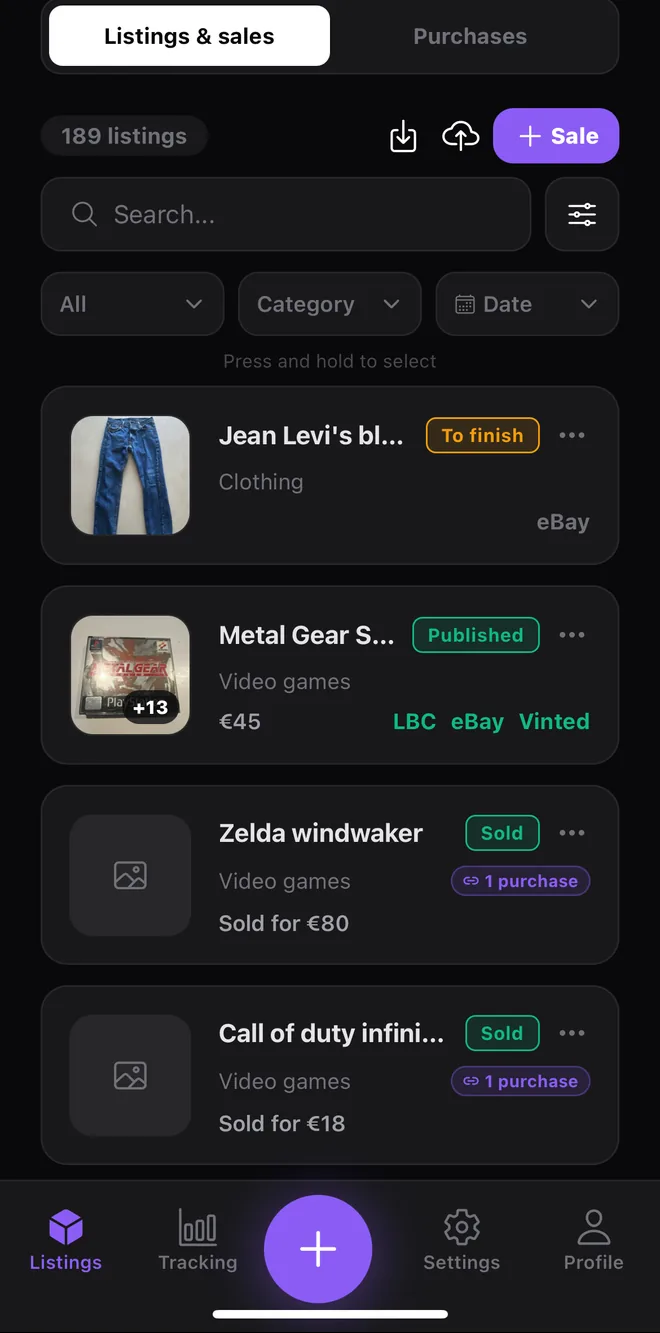
What's live, what's sold, what's gathering dust. Something not moving? The list of what needs relisting, plus guided relisting. Sold? “Create an identical listing” for the second copy.
Purchases
Log what you buy from photos: the AI identifies the items and splits the cost across them pro rata. Link your sales to your purchases to see what you're really making, and which job lots pay off.
Dashboard
Your net margin, your sales by category and platform, the return on every purchase — your best and worst lots, dormant stock, sales at a loss — in one place, so you can steer your business.
Your photos, tidied
Camera roll looking like a marketplace? Postfast files your photos in a dedicated album and, if you ask it to, clears out the photos taken in the app for items you've sold — photos you imported are never touched.
Spot a bargain
Value it before you buy
At a car boot sale or a charity shop, photograph before you get your wallet out. The app estimates the resale value item by item and opens up price searches so you can check for yourself.
Customisation
Your listings, your way
Set your tone, your opening and closing lines once: every listing you generate afterwards picks them up. Try it here.
Vinted
Levi's Trucker denim jacket, size M
Hi! Carefully packed and posted within 48 hours.
Levi's Trucker denim jacket, size M. Classic cut, metal buttons, two chest pockets. The denim has kept its colour. Great for spring and autumn, over a hoodie or a T-shirt.
Thanks for looking, have a great day!
#levis #denimjacket #trucker #denim #sizeM
In violet: what you set. Example output — the real text depends on your photos, and the tone mostly changes the rhythm of the sentences.
A stock of lines
Up to 10 opening lines and 10 closing lines, 300 characters each. You pick the active one in Settings: it's added to every listing you generate afterwards.
Tone, emojis, hashtags
Set once, applied to every generation. Two tones, emojis or none, and hashtags everywhere, on Vinted only, or nowhere.
Your platforms, listing by listing
You tick your default platforms; when you approve each listing, you add or remove some.
Languages & countries
Your country, your platforms, your language
You might be selling from London, Dublin, Berlin or Madrid: pick your selling country and the app lines up with the platforms that actually exist where you are — 51 of them across 13 countries.
The United Kingdom, Ireland, France, Belgium, Switzerland, Luxembourg, Germany, Austria, the Netherlands, Spain, Italy, Portugal and Poland. You pick yours when you sign up, and you can change it whenever you like.
The app in 8 languages
The interface is translated into English, French, Spanish, Italian, German, Dutch, Portuguese and Polish. It follows your phone's language, and you can change it in the settings.
The AI writes in 8 languages
Your listings are written in all eight languages of the app — English, French, Spanish, Italian, German, Dutch, Portuguese and Polish. Each of the thirteen selling countries has its own, and you can ask for up to three on the same listing.
On eBay, publishing straight from the app is for sellers in France; elsewhere, as on every other platform, it's assisted copy and paste. Postfast isn't affiliated with any of these platforms.
Three separate settings, on purpose: the language of the app, the language your listings are written in, and your selling country. A British seller living in Berlin keeps the app in English, publishes on Kleinanzeigen, and has listings written in English.
Need more photo edits? Packs are sold one-off, no subscription: 30 photo edits for €2.49, 70 for €4.99 or 180 for €9.99. They work on the free plan just as well as on Plus.
Prices include French VAT. In other countries, the App Store and Google Play show the local price, in your currency (pounds in the UK, Swiss francs in Switzerland, złoty in Poland). Subscriptions and packs are bought in the app on your phone, and then work on the web app too.
FAQ
Frequently asked questions
Postfast uses recent AI vision models. From your photos, the AI identifies the item, its brand and model when it recognises them, its visible condition and what's included, then writes the listing. What a photo can't show, like a size or a hidden flaw, it doesn't make up: the app flags it so you can fill it in.
It depends on your selling country: you pick it when you sign up, and Postfast only shows the platforms that actually exist where you are. In the UK that means eBay, Vinted, Facebook Marketplace, Etsy, Vestiaire Collective, Depop, Gumtree, Vivastreet, Shpock, Preloved and Locanto; in Ireland, DoneDeal, Vinted, Facebook Marketplace, eBay, Etsy, Vestiaire Collective, Depop, Adverts.ie, Vivastreet and Locanto.ie. Across 13 countries, 51 platforms are covered in total — including Kleinanzeigen in Germany, Wallapop in Spain, Subito in Italy, Marktplaats in the Netherlands and Leboncoin in France.
Yes, for sellers in France: eBay is the only platform where publishing goes through an API today. Connect your eBay account with the official secure flow (OAuth) and publish in one tap straight from Postfast. Outside France, and on every other platform, Postfast writes the text and copies it for you: publishing stays an assisted copy-paste. Postfast never sees your password, and you can revoke the connection at any time. Our eBay guide walks you through it.
Yes, and it is the heart of the app. Record your purchases (including job lots, with the cost split across items automatically), link each sale to its purchase, enter the sale price and the platform fees: Postfast works out your real net margin and ROI. The dashboard then shows your best and worst lots, your dormant stock, your sales per platform, and flags anything sold at a loss.
It's a starting point, not a price guide. For most items the AI suggests a range, checked where possible against eBay listings for the same item. For clothing, shoes and accessories, where the price depends mostly on the size, it doesn't show one. Either way, links open the sold listings on eBay and the current listings on Vinted and your country's classifieds sites (Gumtree in the UK, DoneDeal in Ireland), so you can check before you set your price.
Yes. In Buying mode, photograph an item at a car boot sale, a flea market or a consignment shop: Postfast estimates its resale value and your potential margin against the asking price, and links you to real eBay sales so you can verify. The estimate helps you decide with your eyes open — the decision to buy stays yours.
The app and the AI work in the same eight languages: English, French, Spanish, Italian, German, Dutch, Portuguese and Polish. The interface is translated into all eight, and listings are written in all eight. The two settings stay separate: you can run the app in Polish and have your listings written in English, or ask for up to three languages on the same listing.
When you sign up you choose your selling country from 13: France, Belgium, Switzerland, Luxembourg, Germany, Austria, the Netherlands, Spain, Italy, Portugal, Ireland, the United Kingdom and Poland. Postfast then narrows the platform list to what genuinely exists where you are, and pre-selects the country's two dominant channels. You can change country at any time in the settings.
From one of your photos, the AI produces a version that sells better. The modes depend on the item: a studio background or a styled setting for an item; a studio background, an invisible mannequin or a hanger for clothing. The point is to present the item better, not to disguise it: you compare the render with your original before keeping it, and the original stays in the listing. The mannequin smooths the fabric a little, and the app warns you first. The free plan includes 3 photo edits once, PostFast Plus gives 10 per month, and packs of 30, 70 or 180 photo edits start at €2.49.
Yes. With batch creation you set up your items one after another, then start the generation in the background: the first listing opens for review while the rest are still being written. The free plan allows 5 listings per batch, PostFast Plus allows 20.
Absolutely. You choose the tone (casual or professional), turn emojis and hashtags on or off, and add your own intro and sign-off to every listing. The AI writes in your voice.
Up to 20 photos per item. The first 5 are read by the AI to write the listing, and all of them stay available for your listing. Photos are compressed intelligently so uploads stay fast.
Yes. Open postfast.fr/app and sign in with the same account as on your phone: your listings, purchases and margins are the same. Photos are added from your files. Two things are done from the phone: connecting your eBay account (after that, eBay publishing works on a computer too) and buying a subscription or a photo edit pack.
Your photos are sent securely to two AI providers: OpenAI to recognise the item's category, and Google to write the listing and estimate the price. Each photo you choose to edit also goes to Google. Their terms provide that this data is not used to train their models. The photos in your listings are kept on our servers (Supabase, European Union), reachable only through time-limited signed links, and deleted along with the listing or your account. All the details are in our privacy policy.
BLOG
Practical advice for your next sale
Start with the basics: write a listing, set a price and calculate your margin.